Oops, you clicked.
This was a safe Pace University cybersecurity awareness exercise. No password or multi-factor authentication code was requested or collected. Use this moment to learn how to spot a suspicious student refund message.
Why you are seeing this page
You clicked a link in a simulated phishing email about a BankMobile refund. The message imitated an official refund notice and used urgency and the promise of money to encourage a quick click.
*If this had been a real attack, the next page could have attempted to steal your Pace credentials, MFA code, banking information, or other personal information.*
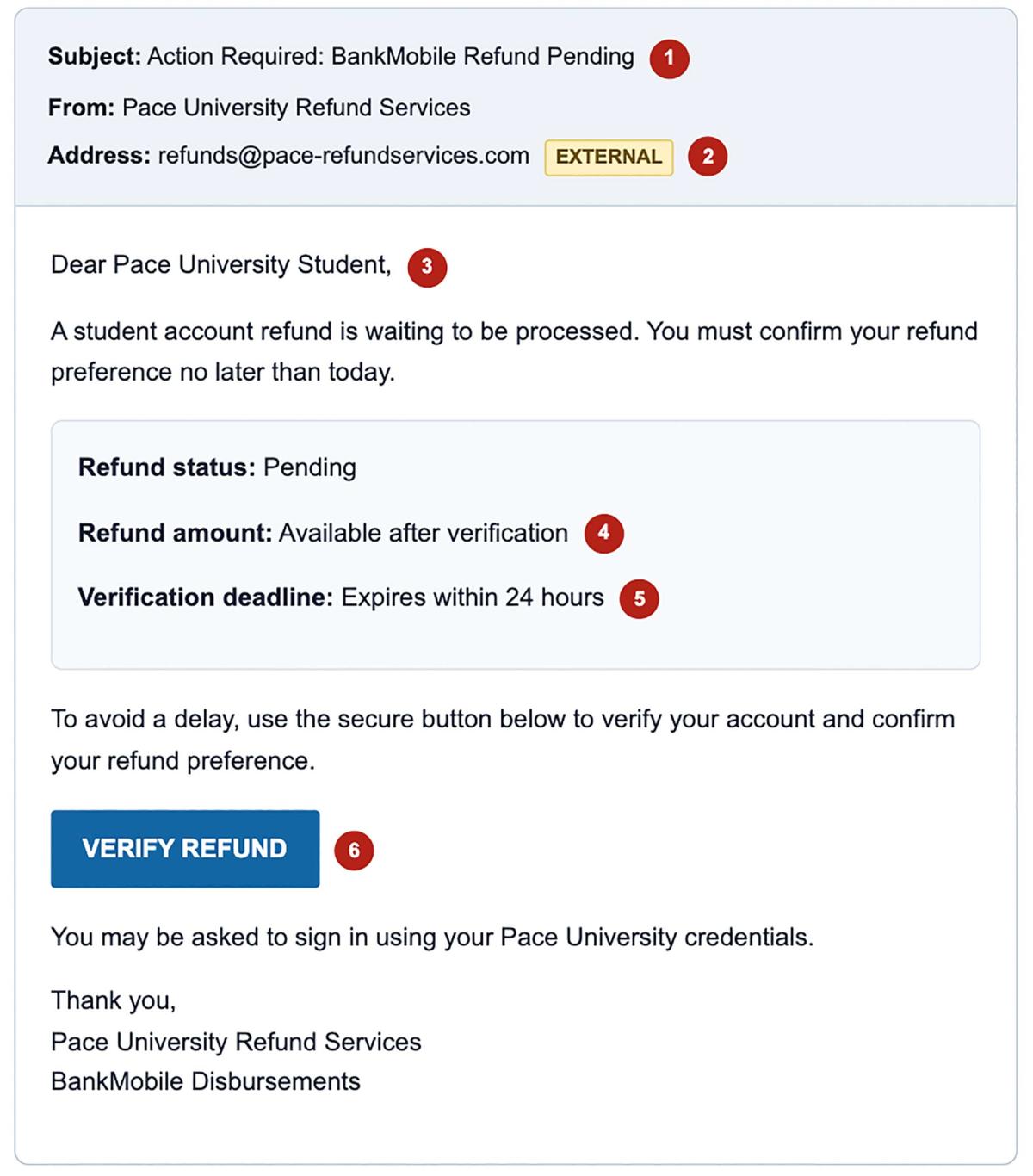
The simulated email
Review the numbered warning signs. Each one is a reason to pause and verify before clicking.
Six red flags
- Unexpected refund: You were not expecting this notice or did not recently check your student account.
- Sender and domain mismatch: The display name looks official, but the address is not an official @pace.edu address.
- Generic greeting: “Dear Pace University Student” does not identify you by name.
- Vague refund amount: The email provides no amount or clear account context.
- Artificial urgency: “Today” and “within 24 hours” pressure you to act without verifying.
- Hidden destination: A verification button can conceal a fraudulent sign-in page.
Verify student refunds safely
- Pause. Do not use an unexpected email button to reach a refund or account page.
- Inspect the sender. Check the complete email address, not only the displayed name or logo.
- Check the destination. On a computer, hover over the button without clicking. On a mobile device, avoid pressing the link if the message is unexpected.
- Use a trusted route. Open a new browser window and manually visit the Pace Portal or Pace's official BankMobile Refunds information page.
- Verify independently. Contact the appropriate Pace office or the ITS Help Desk using contact information from an official Pace website.
Security reminder: Pace University and BankMobile will not ask for your password or MFA code by email. Never approve an MFA request you did not initiate.
If this were a real suspicious message
- Do not reply, click links, open attachments, or enter credentials or financial information.
- Forward the suspicious email as an attachment to iso@pace.edu.
- If you already clicked, entered information, downloaded a file, or approved an MFA prompt, contact the ITS Help Desk immediately.
- Do not delete the message until Information Security or the ITS Help Desk advises you to do so, because the original message may assist the investigation.
Need help or want to report a message?
Information Security Office
Email: iso@pace.edu
ITS Help Desk
Phone: (914) 773-3333
Email: pacehelpdesk@pace.edu
Report Spam, Phishing, or an IT Security Issue